Intended Readers: All students who are
enrolled in any related courses (CS619, CSi619, CS519 etc.)
The Problem:
A recent observation revealed a very important issue in student's mail
boxes.
Many students have intentionally or un-intentionally joined a lot of email
groups resulting in bulk of emails
in the mail box. And many students tend to select all emails on a page, and use
delete option. It is extremely
risky way to handle unwanted emails, as often students delete the important
emails from project supervisor or
other important email from any university official.
Official emails are always important and should be managed very carefully.
Handling mail box is student's own responsibility.
Incorrect solution in practice:
Some students try to cope with this issue using their personal email ids
(such as on Yahoo, Hotmail etc)
This is not a correct approach, as the identity of a student cannot be
verified by any means. Any one could create an email
account on so many web sites, and use that to pretend to be a student of VU.
And most of the times, emails sent using
personal ids, go to SPAM folder, so your supervisor or university official even
doesn't get your email properly. If the
email is received in the inbox, still the identity cannot be verified. Thus this
solution is not acceptable. A proper email conversation
is when a student uses gmail.vu.edu.pk to log in with student id.
Proper Solution:
There are a lot of things to rectify the problem.
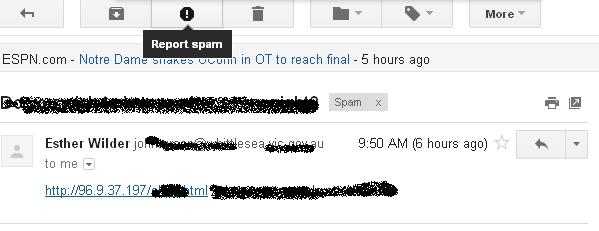
1. Using SPAM option and setting the unwanted emails as SPAM, so once you will
start reporting SPAM, the unwanted emails
will start disappearing automatically from your mail box. Make sure you dont set
an email as SPAM, which is not actually a SPAM
(such as official email from university or from a known person/email id). Below
is the screenshot to help you pick the gmail setting:
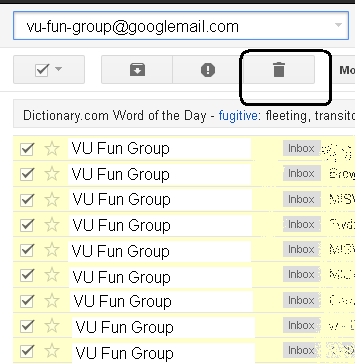
2. Using search options to search similar emails, and delete
them at once, as explained in the following screenshot
3. Using gmail labels and filters to redirect emails from
specific ids to particular labels:
It can be accessed from: Settings > Filters > Create a new filter
Once the filter options are set properly, all the emails from the particular
sender will be available inside proper label. Hence finding
the important emails will be easy and straight forward. A sample flow of the
whole process is as follows:
i)

ii)

iii)

iv)

v)

4.
Un-subscribing from all unwanted groups, so that all the
emails in your mail box remain only the important ones.
Usually there is an option like: "Unsubscribe from mailing list" etc. Which can
be used to stop any particular email group.
5. The above options can be used smartly to get even a better solution. Such as
you can use the option in 3rd point
to create a new label as "Unimportant". And using the filter options to set all
the unwanted emails (such as from email groups).
This way you will still receive the email from such groups, but your inbox will
be very much cleaner as all the other emails can be
redirected to the label: "Unimportant".
NOTE: The above options are to provide comprehensive help to students to
rectify the important issue discussed in start of this page.
In any case, students' themselves are responsible to handle their mail boxes,
and for any inconvenience they face due to bulk emails or other issues.