|
|
|
||||
|
And in the comparison, we know
that there are three conditions i.e. first value is greater than the second value,
first value is less than the second value and first value is equal to the
second value. Here in the above program construct the else part competes the
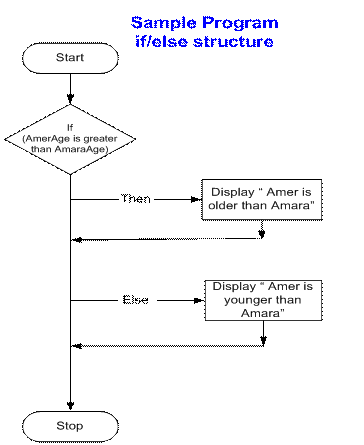
greater than conditions and covers both less than and equal to conditions. Thus in the above program
construct, the message "Amer is younger than Amara" is displayed
even if Amer’s age is the same as Amara’s age. This is logically incorrect
and so to make this correct, we should display the message "Amer is
younger than or is of the same age as Amara". Now this statement
describes both the cases other than the one ‘Amer is greater than Amara'. The use of else saves us from
writing different if statements to compare different conditions, in this way
it cover the range of checks to complete the comparison. If we want to state the
condition "Amer is greater than or is of the same age as Amara’s"
then we use the greater than or equal to operator (i.e. >=) in the if statement
and less than operator ( < ) in the else statement to complete the
comparison. It is very important to check
all the conditions while making decisions for good, complete and logical
results. Make sure that all cases are covered and there is no such case in
which the program does not respond. The flow chart of our program with if/else structure will be as follow.
|
|||||
|
|
Previous |
TOC |
Next |
||